Försäkringskassan

Role

UX/UI Designer

Focus

Information Architecture / UX Research

Project

Student Project

Client

Försäkringskassan

Description

A concept redesign for Försäkringskassan focused on making parental leave and VAB information easier to understand, navigate, and act on.

Försäkringskassan

Role

UX/UI Designer

Focus

Information Architecture / UX Research

Project

Student Project

Client

Försäkringskassan

Description

A concept redesign for Försäkringskassan focused on making parental leave and VAB information easier to understand, navigate, and act on.

Overview

This project was part of a collaboration between Försäkringskassan and our educational program.

Challenge

Försäkringskassan found that parents and expectant parents often had trouble finding and understanding information about parental leave and VAB (care of sick children).

Many users were unsure about their responsibilities, how to track days, and how to complete applications confidently.

Our goal was to make the available information easier to understand, help parents feel more confident while using Försäkringskassans services, and make them feel supported during this important, and sometimes stressful, time in their lives.

Försäkringskassan asked us to explore:

How can we explain complex information and processes more clearly, while still keeping legally sensitive details accurate?
What is the best way to show information about parental leave days and VAB-days to logged-in parents/expectant parents?

approach

We combined quantitative and qualitative methods to understand user needs and pain points.

We conducted:

In-depth interviews with nine parents revealed emotional stress, uncertainty about responsibility, and difficulty remembering where to start in the system
An online survey of 60 parents helped identify common areas of confusion and frustration
In-depth interviews with nine parents revealed emotional stress, uncertainty about responsibility, and difficulty remembering where to start in the system
An online survey of 60 parents helped identify common areas of confusion and frustration

Insights

Two insights strongly shaped our design direction:

1. When information is clear, users feel more confident.

Many parents were unsure if they were doing the right thing, even with simple tasks.

2. Users found it difficult to remember how to get to VAB-related tasks.

Users had trouble remembering how to go from “My Pages” to the right application flow, especially when they were in a hurry.

Design direction

Based on our research, we focused on reducing cognitive load rather than adding new functionality.

Our design direction was guided by four principles:

Reduce reliance on memory by surfacing important actions
Break complex processes into manageable steps
Increase visibility of key information so users always knew where they were
Build confidence through clear guidance and reassuring feedback

We iterated through three design concepts and two rounds of usability testing, gradually refining the prototype to make complex tasks clearer, easier to navigate, and more reassuring for parents.

From Early Concepts to a Clearer Dashboard

In the early stages, we explored several ways to organize the dashboard so parents could easily find what mattered most.

As the design took shape, we moved away from giving every function the same visual weight and introduced clearer groupings and hierarchy.

Ongoing cases, common tasks, and support became easier to distinguish, helping parents focus on what they needed to do.

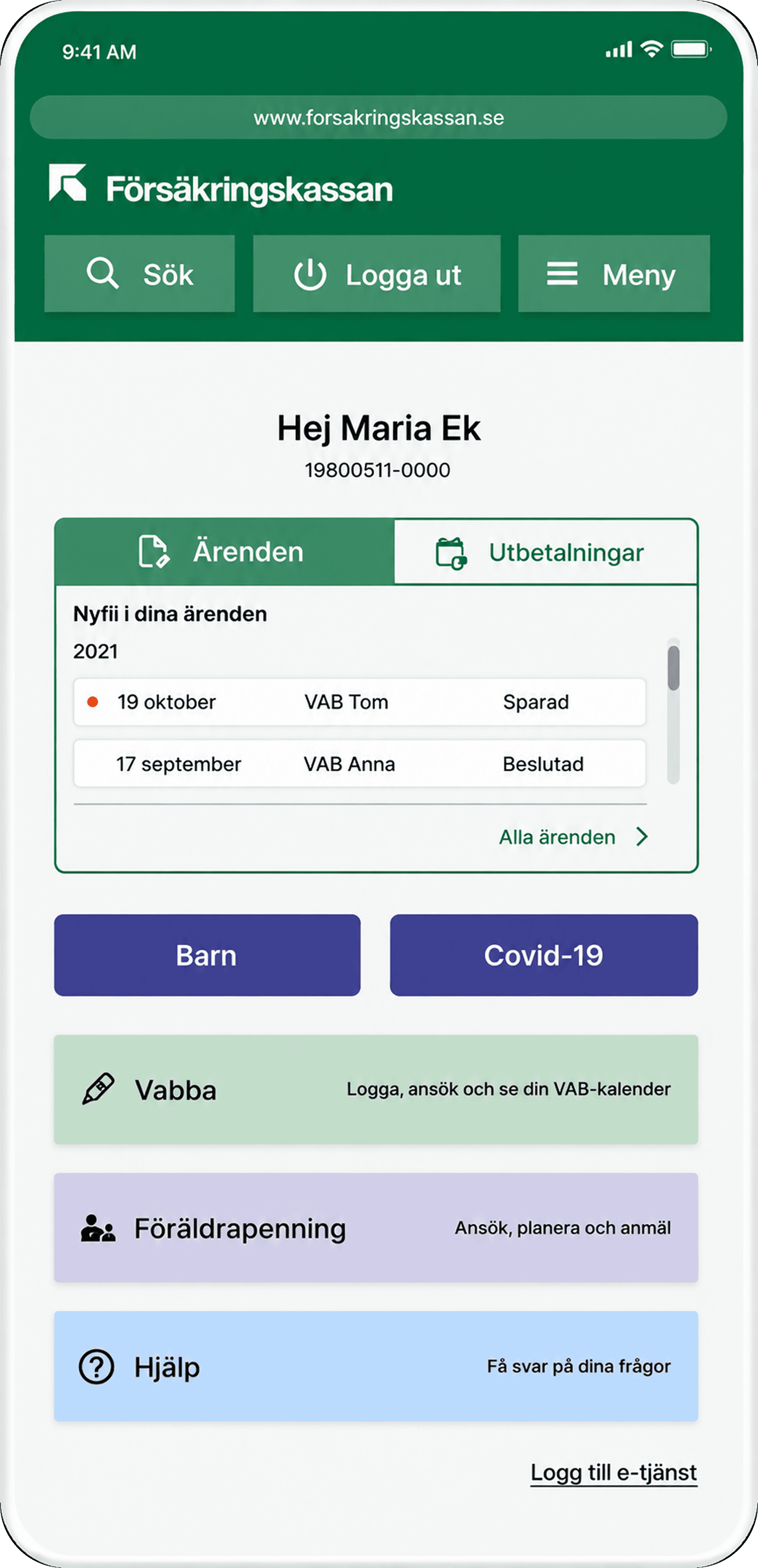
final design

We delivered a high-fidelity prototype to Försäkringskassan that brought these principles together through several key features:

An interactive VAB calendar for logging absences and starting applications
A dashboard providing an overview of registered children, parental leave days, and VAB statistics
Clear, button-based navigation that reduced reliance on memory
A step-by-step checklist helping expecting parents understand what to do and when
Case study image
Case study image
Case study image
Case study image
Case study image

final design

We delivered a high-fidelity prototype to Försäkringskassan that brought these principles together through several key features:

An interactive VAB calendar for logging absences and starting applications
A dashboard providing an overview of registered children, parental leave days, and VAB statistics
Clear, button-based navigation that reduced reliance on memory
A step-by-step checklist helping expecting parents understand what to do and when

Outcome

Försäkringskassan responded positively to the concept, especially appreciating the clearer VAB information and the dashboard overview.

Although this was only a concept project, it showed that making navigation simpler and organizing complex information can help users feel more confident when completing important tasks.

Reflections

This project reminded me that simplifying a complex service doesn’t always mean taking information away. With something like parental leave, some complexity is simply part of the territory.

The challenge is figuring out what people need to know at each step, and organizing it so it’s easy to take in. That matters even more when people are already stressed. New parents, or parents caring for a sick child, shouldn’t have to wade through information or second-guess what matters.

It’s a lesson I’ve carried into my work since, especially when designing for complex products.

Design Systems • Enterprise UX • Manufacturing Execution System

UX Writing • Enterprise UX • Manufacturing Execution System

UI Design • Enterprise UX • Enterprise UX • Manufacturing Execution System

Say hello!

I'm always happy to chat about UX, or new opportunities!

Say hello!

I’m always happy to chat about UX, or new opportunities!

Say hello!

I'm always happy to chat about UX, product design, or new opportunities!

Becka Design 2026©